A website is ready to launch when visitors can reach it, understand it, trust it, and complete its main task—and when search engines can discover the same useful public content.
The short answer
What should you verify before launching a website?
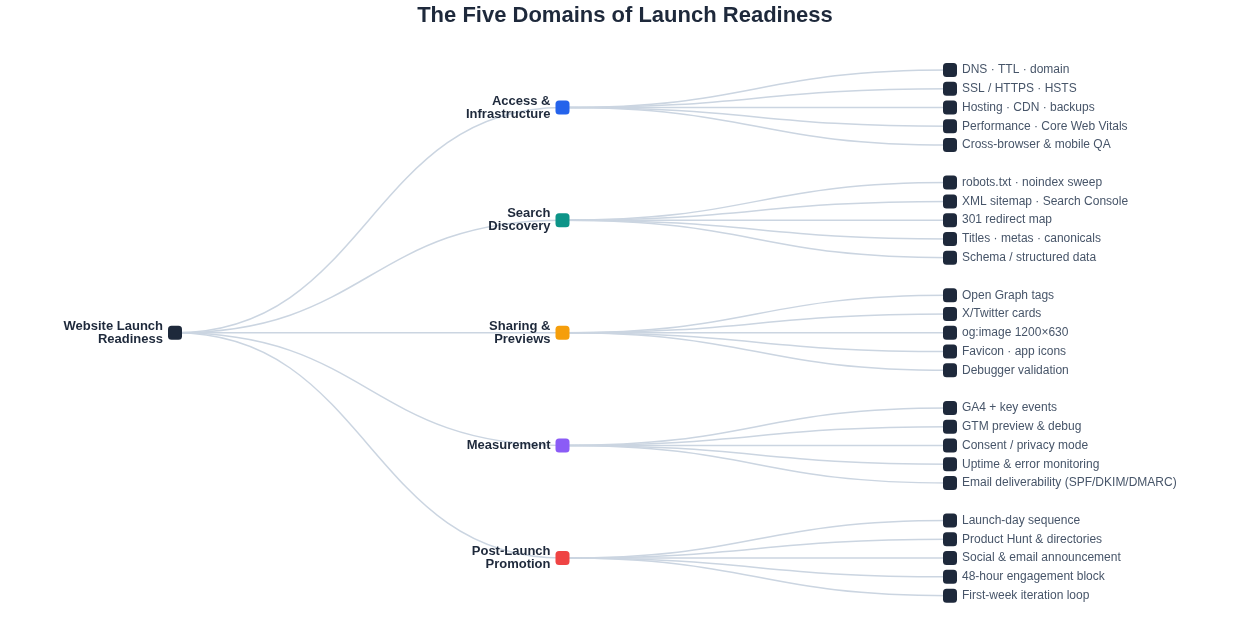
Verify five things: people can reach and use the site; search and AI retrieval systems can discover the intended public pages; shared links produce deliberate previews; important actions are measured and monitored; and the first two weeks of promotion and support have an owner. Test every critical journey on the production domain before sending the announcement.
Do not launch publicly if the canonical domain, HTTPS, primary transaction, privacy controls, indexing policy, or operational monitoring is still uncertain. A missing secondary page can be fixed after launch. A broken payment, exposed private page, or invisible production site is a stop condition.
1. Define “ready” before the final week
A useful launch checklist is a decision system, not a long collection of nice-to-have tasks. Write the release criteria before the deadline creates pressure to reinterpret them. For each critical journey, record an owner, test evidence, current result, and rollback action.
| Decision | Meaning | Examples | Action |
|---|---|---|---|
| Blocker | Creates material harm, data loss, security risk, or a failed primary journey | Invalid certificate, failed checkout, private content exposed, consent ignored | Delay the announcement or roll back |
| Fix before announcement | The site is technically live, but the first audience would receive a misleading or broken experience | Wrong pricing, broken form routing, accidental noindex, missing analytics event | Keep launch quiet until verified |
| Follow-up | The main outcome works and the issue has a safe workaround | Minor spacing issue, noncritical copy refinement, secondary integration delayed | Assign a date and ship after launch |
Test journeys from the visitor’s point of view, not component by component. “The form renders” is not a passing result. A pass means a visitor can understand the labels, submit valid and invalid data, see the right confirmation, receive the expected email, and create the correct record in the destination system.
2. Run the work on a launch timeline
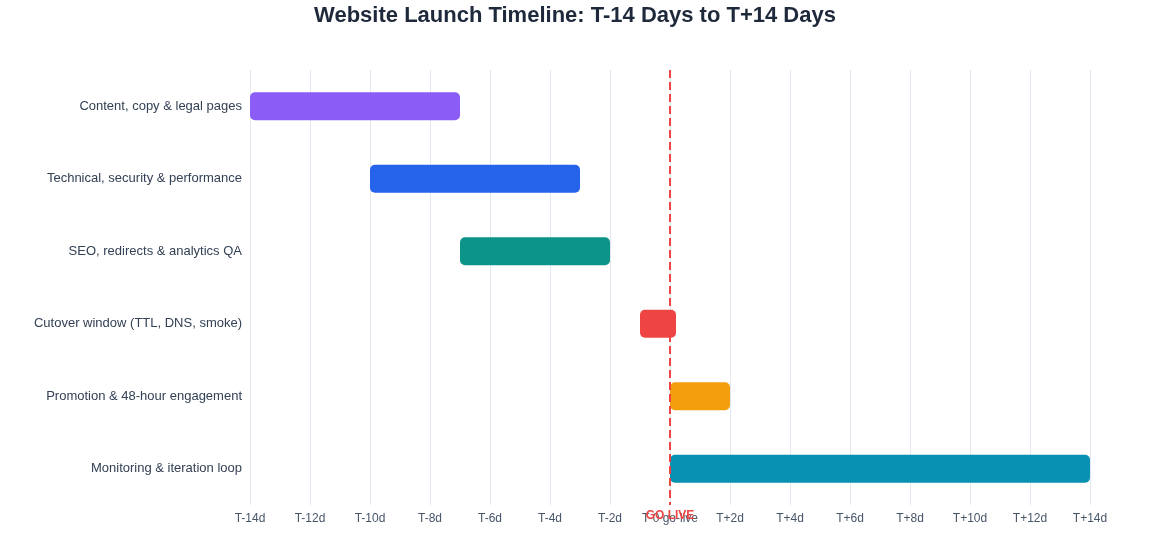
Start early enough that testing can change the release, not merely document its problems. A two-week sequence works for many small launches; migrations, payments, regulated services, and high-traffic launches need a longer runway.
- T−14 to T−10
Freeze the public promise
Finish the core copy, pricing, legal review, information architecture, primary journeys, and redirect inventory. Name owners and define blockers.
- T−10 to T−5
Test the system
Complete browser, device, accessibility, security, performance, form, payment, email, search, and analytics checks in the closest production-like environment.
- T−5 to T−2
Prepare cutover and distribution
Close high-risk defects, rehearse rollback, prepare launch messages and sharing assets, verify monitoring, and export current DNS and application configuration.
- T−24 hours
Freeze avoidable change
Take a verified backup, run the final crawl, confirm support contacts and alert routes, and lower DNS TTL only when a DNS cutover is actually required.
- T+0 to T+1 hour
Cut over, then smoke-test
Verify the live domain, response codes, certificates, critical journeys, robots directives, analytics events, email delivery, and monitoring before announcing.
- T+1 to T+14 days
Observe and improve
Watch errors, search coverage, user questions, conversion paths, and referral quality. Fix confusion while the evidence is fresh.
3. Access and infrastructure: can everyone reach and use the site?
Domain, DNS, HTTPS, and rollback
Choose one canonical HTTPS origin—such as https://www.example.com—and make every other hostname and protocol variant redirect permanently to it. The certificate must cover every hostname that receives traffic. Canonical tags, sitemaps, internal links, sharing metadata, and structured data should all use the same production origin.
Before changing DNS, preserve the existing records and identify which ones control email and third-party verification. A website cutover should not remove MX, SPF, DKIM, DMARC, or service-validation records. If you lower TTL for a cutover, do it deliberately, record the old value, and restore a normal value after the change has stabilized.
- Export the current DNS zone and record the registrar, DNS provider, and people with access.
- Confirm the apex and
wwwbehavior, HTTP-to-HTTPS redirect, certificate chain, and renewal process. - Check for mixed-content requests and production pages that still load staging assets.
- Take a restorable backup of application data and uploaded files; document the rollback trigger and operator.
- Verify production secrets, background jobs, storage, webhooks, scheduled tasks, rate limits, and provider quotas.
- Return useful error pages without exposing stack traces, credentials, internal hostnames, or customer data.
Security checks should match the risk
Use the OWASP Application Security Verification Standard and relevant threat model rather than treating a generic scanner as proof of safety. At minimum, review authentication, authorization, session handling, input validation, secrets, dependency vulnerabilities, security headers, backups, and incident contacts. Test that one user cannot access another user’s records by changing an identifier.
Performance and real devices
Measure the pages visitors will actually land on and the interactions that matter. Google’s “good” Core Web Vitals thresholds are LCP at or below 2.5 seconds, INP at or below 200 milliseconds, and CLS at or below 0.1, assessed at the 75th percentile. Lab tools help diagnose a launch candidate; field data describes what real visitors experience and accumulates after release.
| Metric | What it represents | Good threshold | Launch checks |
|---|---|---|---|
| LCP | When the largest visible content element appears | ≤ 2.5 seconds | Optimize the hero or main text, server response, critical CSS, fonts, and image delivery |
| INP | How quickly the page responds to user interaction | ≤ 200 ms | Exercise menus, forms, filters, and dialogs; reduce long main-thread work and unnecessary scripts |
| CLS | Unexpected movement while the page is visible | ≤ 0.1 | Reserve image and embed space, stabilize banners, and avoid inserting content above what a visitor is using |
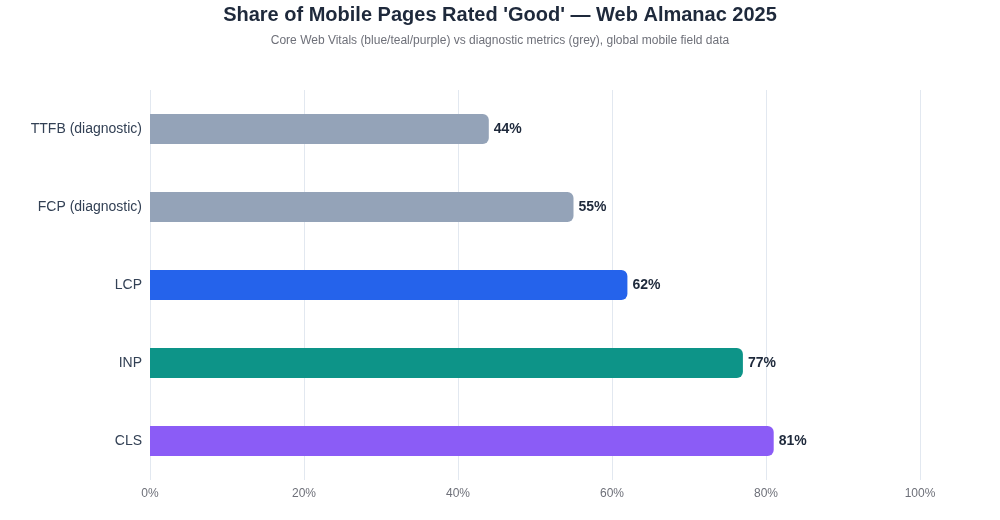
Test with at least one physical iPhone and Android device, a keyboard, zoomed text, and the browsers your analytics or audience research makes important. Resize-only testing misses virtual keyboards, touch targets, viewport behavior, password managers, autofill, and device-specific media handling.
Test complete journeys
Create a compact test matrix for the homepage, primary landing page, signup or enquiry flow, authentication, checkout if applicable, account recovery, and contact route. Include a valid case, an invalid case, a retry, and a failure from a downstream provider. For payments, use the provider’s documented test environment before go-live and a controlled live transaction after cutover.
4. Search discovery: can search engines find the intended public version?
Crawling, indexing, and ranking are different outcomes. A sitemap can help a search engine discover preferred URLs, but Google describes sitemap submission as a hint; it does not guarantee indexing or ranking. Your launch check is to remove accidental barriers and present one coherent public version.
| Control | What to verify | Common launch failure |
|---|---|---|
| Status and HTML | Priority URLs return a useful 200 response and meaningful initial HTML | Soft 404s, client-only placeholders, login walls, or error templates returning 200 |
| robots.txt | Production rules permit the crawlers you intend to serve and reference the sitemap | A staging-wide Disallow: / ships to production |
| Robots meta | Indexable templates do not carry noindex; private and thin pages still do | A layout-level staging directive affects every page |
| Canonical URL | Every indexable page names the intended absolute production URL | Canonicals point to staging, HTTP, or the wrong host |
| Internal links | Important pages are reachable through ordinary HTML links | Orphan pages exist only in scripts, search boxes, or the sitemap |
| XML sitemap | Only canonical, useful, indexable URLs appear; the file parses and uses absolute URLs | Redirects, 404s, parameters, or private URLs are included |
| Structured data | Markup describes visible, current facts and validates for the applicable type | Schema claims content or relationships visitors cannot verify |
Handle redirects as a content map
For a redesign or domain move, map each valuable old URL to its closest new equivalent. Do not redirect every retired page to the homepage. Remove redirect chains where practical, update internal links to their final destinations, preserve query parameters only when they carry necessary state, and keep redirects long enough for users and crawlers to adopt the new locations. Google treats redirects and canonical annotations as stronger canonical signals than sitemap inclusion in its canonical URL guidance.
Include AI retrieval in the access decision
If discovery through assistants matters, review crawler policy by provider and by role: search indexing, user-requested retrieval, and model training are not always the same agent. Confirm that the CDN or firewall agrees with robots.txt and that key answers appear in the initial HTML. The companion guide explains AI discovery for new websites in depth.
5. Sharing and previews: control the first impression
Launch URLs travel through email, messaging apps, social networks, directories, and private communities. Each key destination should supply a deliberate title, description, canonical URL, and absolute preview image using the Open Graph protocol. Also include the card metadata required by any priority platform.
- Open the title and description outside the site context. They should still explain the page and avoid duplicated branding.
- Use an absolute, publicly fetchable image URL with declared dimensions and meaningful alternative text where supported.
- Keep important text and faces away from crop-prone edges; check small-screen and light/dark presentation.
- Validate the exact URLs used in the announcement. Preview crawlers cache results, so trigger a re-scrape after a correction.
- Add a favicon, touch icon, and intentional browser color. Confirm they resolve on the production host.
- Review titles, headings, price, screenshots, footer details, contact routes, and every claim visible above the fold.
A single 1200×630 image is a practical default for many large preview cards, but platform behavior changes. Treat the rendered preview—not a remembered dimension—as the pass criterion.
6. Measurement and monitoring: will you know what happened?
Measure a small number of outcomes that can change a decision. A launch dashboard with page views but no form, signup, purchase, or submission events cannot tell you whether the site worked. Write an event specification with the event name, trigger, required properties, consent behavior, destination, owner, and test evidence.
| Layer | Minimum launch setup | Live verification |
|---|---|---|
| Product analytics | Page views plus events for the primary outcome and important funnel steps | Complete the journey and confirm events and properties in the provider’s debug or realtime view |
| Error tracking | Frontend and backend exceptions with release and environment labels | Send a controlled test event and confirm alert routing |
| Uptime | Homepage and critical endpoint checks from outside the hosting environment | Test a deliberately invalid path or maintenance check without disrupting production |
| Logs | Request, job, email, payment, and audit logs retained for an appropriate period | Trace one real journey across the systems involved |
| Search | Google Search Console and Bing Webmaster Tools verified; sitemap location recorded | Inspect representative live URLs and monitor indexing over time |
| Sending domain authenticated and transactional templates reviewed | Receive signup, recovery, receipt, and contact messages in controlled inboxes |
If you use Google Analytics, Google’s setup troubleshooting guide says DebugView events should appear within seconds, while standard reports can take 24–48 hours. Do not wait for a normal report to discover that the launch event was never sent.
Privacy requirements vary by jurisdiction, audience, technology, and purpose. Make consent behavior part of the test plan: verify the default state before a choice, the state after acceptance or rejection, withdrawal, and the behavior of each analytics or advertising tag. Google’s consent mode documentation describes its tag behavior, but it is not legal advice or a complete compliance program.
7. Accessibility and legal review: who might the site exclude or mislead?
Use WCAG 2.2 as the technical accessibility reference and combine automated checks with manual testing. Automated tools find only some barriers. A launch pass should include keyboard navigation, visible focus, logical heading and landmark structure, text alternatives, labeled inputs, useful error messages, sufficient contrast, zoom and reflow, target size, reduced-motion behavior, and captions or transcripts where media needs them.
- Complete every primary journey without a mouse and without losing focus.
- Zoom to 200% and check that content and actions remain available without destructive overlap.
- Run an automated scan on each distinct template, then manually review the findings.
- Use a screen reader for the navigation, headings, form labels, errors, dialogs, and confirmation state.
- Confirm motion can be reduced and that information is not conveyed by color, position, sound, or animation alone.
Legal requirements cannot be reduced to a universal footer checklist. Identify the countries served, data collected, tracking and advertising systems, commercial model, regulated claims, refund or cancellation rules, accessibility obligations, and age restrictions. Have a qualified reviewer assess the required privacy notice, consent controls, terms, business disclosures, and consumer information for the actual business. Do not copy another company’s legal text.
8. Launch day: use a runbook, not memory
Assign one release lead who records each result and has authority to pause the announcement. Keep engineering, content, support, and any critical provider contacts reachable during the verification window.
- 01
Record the starting state
Confirm the approved release, backup, rollback procedure, DNS values, monitoring state, known issues, and incident channel.
- 02
Perform the cutover
Deploy the approved release and make only the planned domain, routing, feature-flag, or provider changes.
- 03
Verify the public boundary
Check DNS from outside the office network, HTTP and HTTPS behavior, certificate validity, security headers, status codes, canonical URLs, robots.txt, sitemap, and representative raw HTML.
- 04
Complete real journeys
Run the primary mobile and desktop paths with controlled accounts or transactions. Confirm database, email, payment, analytics, and support outcomes.
- 05
Read the signals
Review logs, exceptions, queue health, response times, uptime checks, third-party status, and alert delivery. Compare results with the recorded baseline.
- 06
Make the launch decision
Announce only after every blocker is closed or explicitly rolled back. Publish known limitations that affect users rather than hiding them.
9. The master website launch checklist
Copy these checks into the release ticket and add an owner, result, evidence link, and verified-at timestamp. The list is intentionally ordered from launch blockers to compounding follow-up work.
Access and operation
- Canonical HTTPS domain resolves; alternate hosts and protocols redirect once to it.
- Certificates cover the receiving hosts and renewal is monitored.
- DNS changes preserve mail and verification records; rollback values are recorded.
- Backups are current and a restore or rollback procedure has been rehearsed.
- Primary journeys pass with valid, invalid, retry, and downstream-failure cases.
- Mobile, keyboard, zoom, screen-reader, browser, and slow-network checks are complete.
- Production errors do not reveal secrets or personal data.
Search and sharing
- Priority pages return useful initial HTML and intentional status codes.
- Production robots.txt has no accidental blanket block and names the sitemap.
- Public templates have intended robots directives and absolute canonical URLs.
- The sitemap contains canonical, useful, indexable production URLs only.
- Old URLs redirect to relevant new destinations without avoidable chains.
- Titles, descriptions, headings, structured data, and visible facts agree.
- Open Graph and card previews have been rendered for announcement URLs.
- Search Console and Bing Webmaster Tools are verified and the sitemap is submitted.
Measurement and trust
- Primary outcome and funnel events appear with correct properties in live debugging.
- Consent choices correctly change tag and storage behavior.
- Exception, uptime, certificate, domain, queue, and provider alerts reach an owner.
- Transactional emails authenticate, arrive, render, and link to the production host.
- Privacy, business, consumer, accessibility, and regulated-claim reviews match the actual launch scope.
- Support, correction, security, and incident-reporting routes are visible and staffed.
Launch and the first two weeks
- The launch lead, decision time, incident channel, and provider contacts are recorded.
- The announcement links to the verified canonical page and asks for a specific action or type of feedback.
- Someone owns replies, support, moderation, and production monitoring during the first wave.
- Daily checks cover errors, failed journeys, referral quality, search coverage, and recurring questions.
- A seven-day review converts evidence into fixes, FAQs, follow-up content, and channel decisions.
- A thirty-day review compares outcomes with the pre-launch baseline and chooses the next investment.
What to do after the checklist passes
Keep the first announcement focused: what launched, who it helps, what someone can do, and what feedback would be useful. Then move into the website launch announcement guide and the 90-day website promotion guide. The checklist gets the site safely into the world; observation and useful follow-up make the launch compound.
This guide provides general operational information. Security, privacy, accessibility, consumer, and other legal duties vary by jurisdiction and service. Use qualified professional advice for decisions that require it.
Frequently asked questions
When is a website ready to launch?
- It is ready when its intended visitors can access it, understand the offer, complete the primary task, and receive clear feedback, while the owner can monitor failures and correct problems.
Should a new website be perfect before launch?
- No. It should be safe, usable, truthful, and complete enough for its main purpose. Nonessential refinements can follow after real visitor feedback.
How can I check a website before launch?
- Review the public page manually, test its critical journeys on mobile and desktop, inspect search and sharing metadata, and run an automated page check for evidence-backed issues.
Sources and methodology
LaunchIndex Research reviews this guide against primary documentation and the public LaunchIndex methodology. Platform behavior can change, so the updated date is part of the record.
- Google crawling and indexing documentation
- Google sitemap documentation
- Google canonical URL guidance
- Google Core Web Vitals guidance
- HTTP Archive 2025 Web Almanac: performance
- Web Content Accessibility Guidelines 2.2
- OWASP Application Security Verification Standard
- Google Analytics setup troubleshooting
- The Open Graph protocol
Explore LaunchIndex data
Browse the new website directory or review published aggregate research. Launch profiles record when LaunchIndex first observed a public website live; they are not claims about an official launch date.