A useful website launch announcement says what changed, who the website is for, what someone can do now, and why the launch matters. Lead with the visitor's outcome rather than a vague celebration.
The short answer
How should you announce a website launch?
Say what launched, who it helps, what that person can now do, why the change matters, and the single next action. Link to a production page that repeats the promise and works on mobile. Existing users also need reassurance about what has not changed and where to get help.
Treat the announcement as a campaign: prepare the audience and internal team, put the website live quietly and verify it, publish a coordinated reveal, then follow up with a tour, answers, evidence, and improvements. The announcement should be about the visitor’s gain—not the effort required to build the site.
1. Write the message with the CLEAR spine
A reader gives the announcement a small attention budget. Put the information in the order their questions arise.
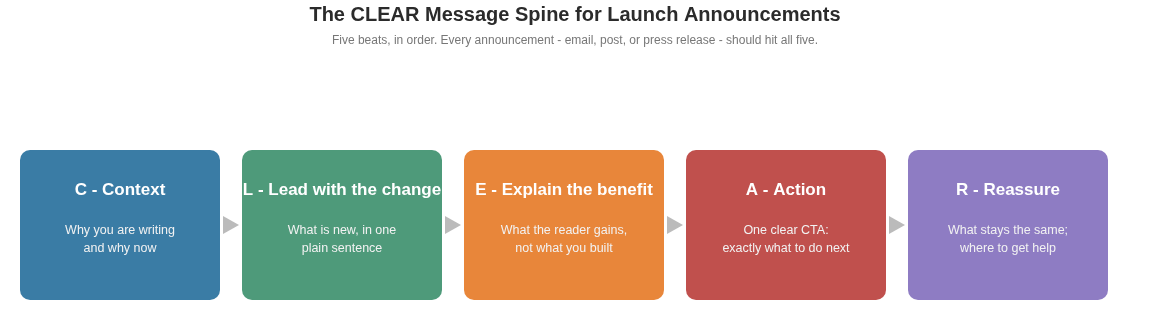
Context
Why are you writing now? Use one sentence: “You told us it was hard to compare plans on a phone.”
Lead with the change
Name the launch plainly: “Today, our rebuilt website is live.” Do not make the reader decode a teaser after the reveal.
Explain the benefit
Translate features into outcomes: “Compare every plan on one page” is stronger than “We redesigned pricing.”
Action
Choose one primary next step: explore, start a check, view pricing, join the beta, submit a site, or reply with a specific kind of feedback.
Reassure
Tell existing users what stayed the same—accounts, saved work, billing, service, support—and where to report a problem.
Run the clarity test
Show the message to someone outside the project. Can they state what launched, why it matters, and what to do next after ten seconds?
Use one CTA and a destination that fulfills it
The announcement email’s job may be to earn a click; the landing page’s job is to explain and convert; a launch article’s job is to document the reasoning. Do not make one asset perform all three jobs. Secondary links can exist, but the visual hierarchy should make the primary action unmistakable.
Apply a “so what?” edit to every feature sentence. “We added a searchable resource library” becomes “Find any template by task without emailing support.” “We moved to a new platform” becomes “The site now works reliably on the older phones many customers use.” Delete any sentence that cannot reach a visitor outcome or a necessary reassurance.
2. Plan a three-phase campaign, not one post
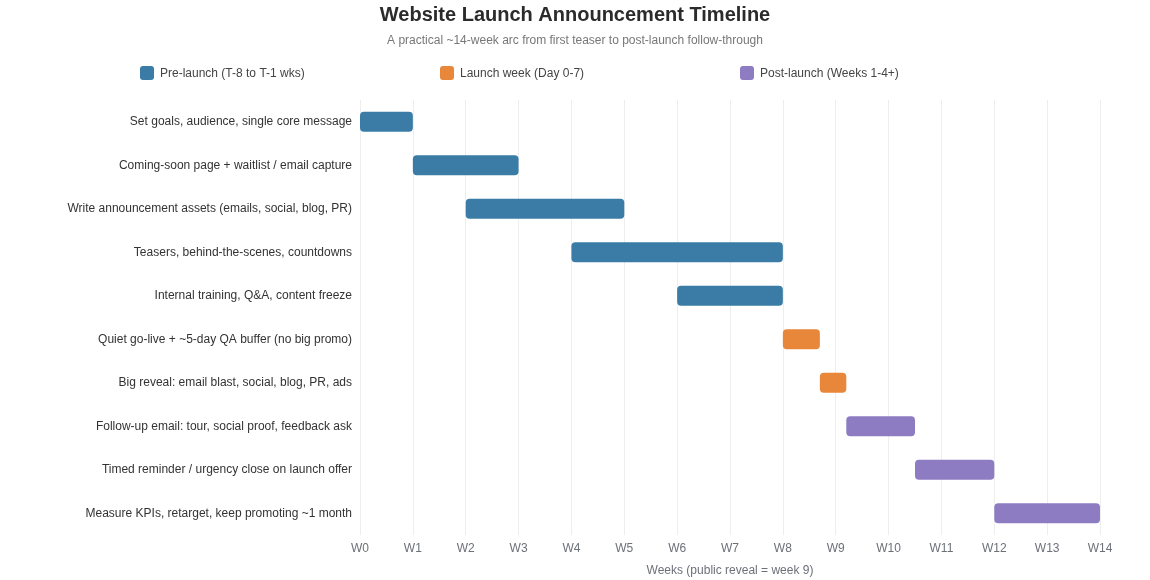
Phase 1: prepare the audience and the organization
Define the audience, message, primary action, support plan, and measurement before drafting ten social posts. Prepare only the teasers that create a useful expectation: a waitlist for an upcoming product, a behind-the-scenes explanation for an established community, or an early notice for customers affected by navigation, account, price, or policy changes.
Train customer-facing colleagues before public promotion. Give support and sales a working preview, a short explanation of the change, known limitations, answers to likely questions, escalation routes, and approved screenshots. Internal clarity prevents five versions of the launch story appearing in customer conversations.
Phase 2: go live quietly, verify, then reveal
Separate technical go-live from the public announcement. The right buffer depends on risk: a simple brochure site may need hours; a migration, checkout, account system, or large redirect map may need several days. During the quiet window, complete the website launch checklist, run real transactions or enquiries, inspect analytics and email delivery, and fix blockers.
On reveal day, coordinate the owned channels first: customer or subscriber email, launch article, relevant website banner, and tailored social posts. Activate partners, launch platforms, community posts, and media outreach only when each one has an audience-specific reason to care.
Phase 3: turn questions into follow-up
Do not repeat “we launched” for a month. Rotate the evidence: a short tour, the most useful feature, an answer to the most common question, an early fix, a customer example, or a transparent lesson. Follow-up shows that the website is maintained and gives people who missed the reveal a new entry point.
3. Give every channel one job
| Channel | Primary job | Best format | Watch-out |
|---|---|---|---|
| Reach people who already gave permission to hear from you | Short reveal with one action, followed later by a tour or feedback request | Wrong segment, weak deliverability, too many CTAs, or an unsupported claim | |
| Launch article | Hold the durable story and details | Problem, decision, what changed, examples, limitations, credits, next steps | A self-congratulatory project diary with no reader value |
| Social | Make the benefit easy to understand and share | Native screenshot, short demo, concise story, accessible captions | Identical copy everywhere, link-only posts, no reply coverage |
| Website | Fulfill the promise and orient returning visitors | Relevant banner, “what changed” note, tour, updated help content | Obstructive modal, stale notice, or announcement pointing at the homepage without context |
| Community | Create discussion with an audience that understands the problem | Useful artifact or lesson, disclosed relationship, active participation | Promotional link drop or vote coordination |
| Launch platform | Package the product for an existing discovery audience | Strong listing, demo, maker explanation, prompt replies | Optimizing for rank rather than activated users or learning |
| Partner | Borrow trust from a real relationship | Optional share kit with factual copy, image, and trackable link | Undisclosed incentive or forcing a partner into generic copy |
| Press | Support genuinely newsworthy coverage | Specific news angle, evidence, spokesperson, assets, concise facts | Treating a visual redesign alone as news |
Email sequence: reveal, tour, feedback
- 01
Reveal
Subject line states the change. Opening gives context and the benefit. One button opens the verified destination. Reassurance and support route close the message.
- 02
Tour
Send only when the audience benefits from guidance. Show two or three tasks with annotated screenshots or a short captioned video.
- 03
Feedback
Ask a narrow question that someone can answer by reply or a brief form. Share what has already been corrected so the request feels reciprocal.
Use only lists and contact methods that the organization is entitled to use. Make identity and opt-out clear, respect prior choices, and apply the laws relevant to the sender and recipients. The UK ICO’s direct marketing guidance is one jurisdiction-specific starting point, not a universal rulebook.
4. Adapt these launch announcement templates
Customer email · website redesign
Subject: The new [Brand] website is live
You told us it took too long to find [important information or task]. Today, our rebuilt website is live.
You can now [benefit one], [benefit two], and [benefit three]. Your [account, saved work, plan, or service] has not changed.
[Explore the new website]
If something does not look right, reply to this email or contact [support route]. We are reading every report.
New product · concise reveal
[Product] is live for [specific audience]
[Audience] use [current workaround] to [job], but it breaks when [specific constraint]. We built [Product] so they can [outcome] without [cost or friction].
It is available today at [canonical URL]. Try [primary action], and tell us [one specific thing you want to learn].
LinkedIn · founder-led
Nobody should need [painful workaround] to [desired outcome].
That is why we rebuilt [site/product]. It is live today.
The new version lets [audience] [benefit one] and [benefit two]. This 30-second walkthrough shows the complete path. [Link]
Thank you to [specific contributors]. If you work on [problem], what should we improve next?
Community launch · learning-led
We built [thing] after seeing [specific problem] repeatedly
Here is the approach, what surprised us, and the trade-off we have not solved yet. You can try it without [avoidable barrier] at [link]. I am the [founder/builder] and will be here to answer technical and product questions.
Example: translate features into benefits
| Project language | Reader language |
|---|---|
| We migrated to a new CMS | Every guide now has a clear owner and visible update date |
| We redesigned the navigation | Reach pricing, documentation, and support from every page |
| We added advanced search filters | Narrow 5,000 listings to the right category and launch month |
| We improved responsive styles | Complete the main task on a phone without zooming or horizontal scrolling |
| We instrumented conversion events | We can now see where the application fails and fix the right step |
5. Choose timing from readiness and audience behavior
There is no universal best weekday or hour. Use your own subscriber and customer activity, recipient time zones, support coverage, and competing events. Schedule the reveal when the team can monitor and respond. A statistically fashionable send time is a poor choice if the production or support team is unavailable.
Before reveal
Prepare
- Define the one message and action.
- Segment affected and unaffected users.
- Finish and test every asset.
- Train the internal team.
- Verify the live destination quietly.
Day 0
Reveal
- Send the main owned-channel message.
- Publish the durable launch article.
- Post channel-specific versions.
- Activate appropriate partners and platforms.
- Monitor product and support signals.
Days 1–7
Explain
- Reply to every substantive question.
- Publish the short tour.
- Fix conversion blockers.
- Turn recurring confusion into help content.
- Record channel quality.
Days 8–30
Prove and learn
- Share a real improvement or result.
- Ask for focused feedback.
- Follow up with relevant media once.
- Review conversion and retention.
- Move the story into regular content.
6. Measure whether the announcement worked
Define the primary outcome before sending. Use consistent campaign parameters for channels, but never put personal information in URLs. Compare each channel from exposure through a meaningful product action.
| Review point | Inspect | Decide |
|---|---|---|
| Day 0–1 | Errors, uptime, forms, payment, email delivery, event collection, support volume | Is the destination safe and reliable enough to keep promoting? |
| Day 7 | Delivered email, clicks, qualified referrals, activation, replies, questions, channel cost | Which message and channel produced the intended behavior? |
| Day 30 | Returning users, retained accounts, revenue or enquiries, citations, organic discovery, resolved objections | Did the launch create durable value, and what should the next campaign repeat? |
Open rate is diagnostic, not the outcome. A highly opened email that sends unqualified visitors to a confusing page is weaker than a modest send that creates the right conversations. Pair analytics with replies, support notes, interviews, and observations from people who did not act.
7. Website launch announcement checklist
Message
- The opening states what launched and for whom.
- Every feature is translated into a reader outcome.
- One primary CTA names the next action.
- Existing users know what stayed the same.
- Claims, prices, screenshots, and dates match the live site.
Destination
- The canonical page repeats the promise above the fold.
- Mobile, keyboard, forms, payment, email, and analytics have been tested live.
- Sharing previews render deliberately.
- Support and correction routes work.
- Known limitations are communicated honestly.
Distribution
- Email permission, segmentation, identity, and opt-out are correct.
- Each social or community version fits its audience and rules.
- Partners receive optional accurate assets and disclose relationships.
- Press outreach has a real news angle and usable evidence.
- Someone owns replies and monitoring during the first wave.
Follow-up
- The tour, feedback ask, and first update are scheduled.
- Campaign links and product events identify channel quality.
- Questions become FAQs and product fixes.
- Day-1, day-7, and day-30 reviews have owners.
- The campaign transitions into the post-launch promotion plan.
Marketing, privacy, consumer-protection, and platform rules vary by jurisdiction and channel. Verify the current requirements for your audience and obtain professional advice where appropriate.
Frequently asked questions
What should a website launch announcement include?
- Include what launched, who it is for, the problem it solves, the main action someone can take, a canonical link, and the kind of feedback you want.
Where should I announce a new website?
- Use channels where the intended audience already participates: customer email, relevant communities, industry publications, founder networks, and suitable launch directories.
Should I announce before or after the site is live?
- Send the main announcement only after the public destination and its critical journeys work. A limited preview can happen earlier when it is clearly labeled and access is intentional.
Sources and methodology
LaunchIndex Research reviews this guide against primary documentation and the public LaunchIndex methodology. Platform behavior can change, so the updated date is part of the record.
- UK Government content design guidance
- Google helpful content guidance
- Google Analytics campaign URL guidance
- ICO direct marketing guidance
- FTC advertising and endorsement guidance
- Product Hunt launch guidance
Explore LaunchIndex data
Browse the new website directory or review published aggregate research. Launch profiles record when LaunchIndex first observed a public website live; they are not claims about an official launch date.